1
Get to the Forms page
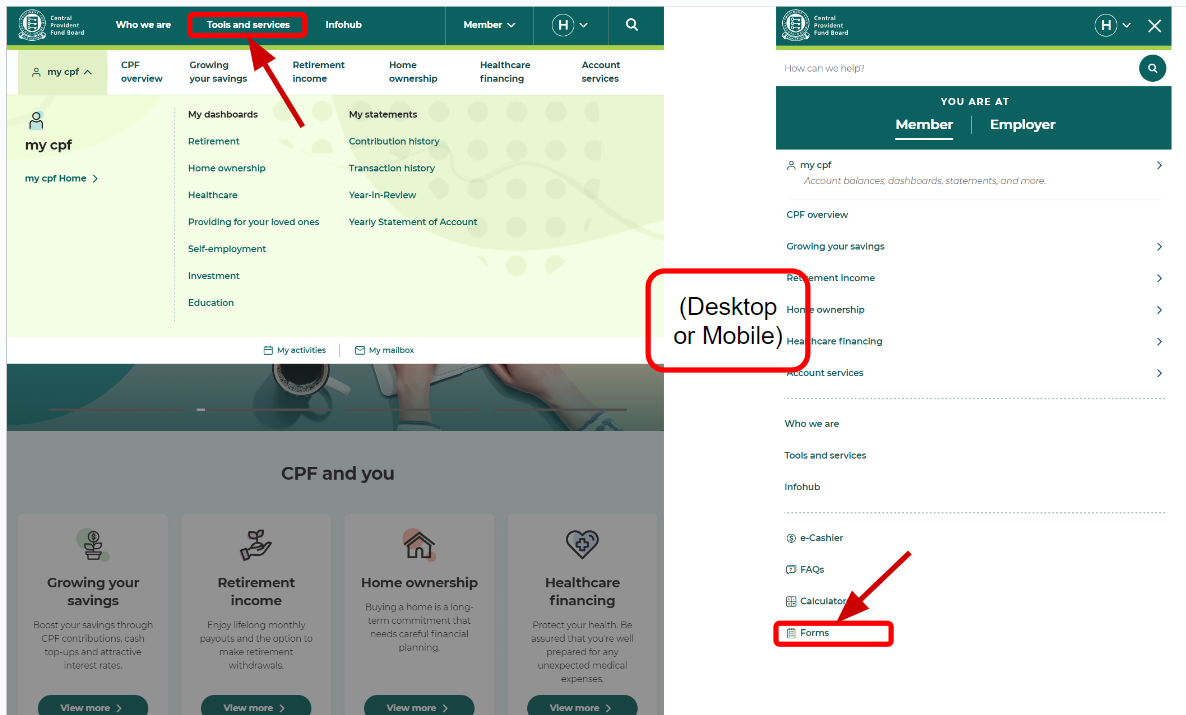
Go to cpf.gov.sg. Both routes below land on the same page.
- On desktop: click Tools and services in the top menu bar.
- On mobile: tap the menu icon at the top right, scroll down, tap Forms.

When you take a bank loan, CPF does not start servicing your monthly instalment automatically. Until you submit this application, the bank deducts the full instalment from your bank account in cash. Every month.
The two paths are completely different. Get this wrong and you will spend ten minutes filling in a form that does not apply to you.
Private property, or an HDB flat financed with a bank loan. You apply directly through CPF using the eight steps below.
HDB manages the CPF deduction for you through the HDB Flat Portal. You will see the link to it inside Step 3. Nothing else here applies.
| Property type | Start a deduction | Change it later |
|---|---|---|
| Private property | 3 working days | 1 working day |
| HDB flat on a bank loan | 5 working days | 1 working day |
Submit at least 5 working days before your monthly instalment deduction date. That is the floor, not the target.
Go to cpf.gov.sg. Both routes below land on the same page.
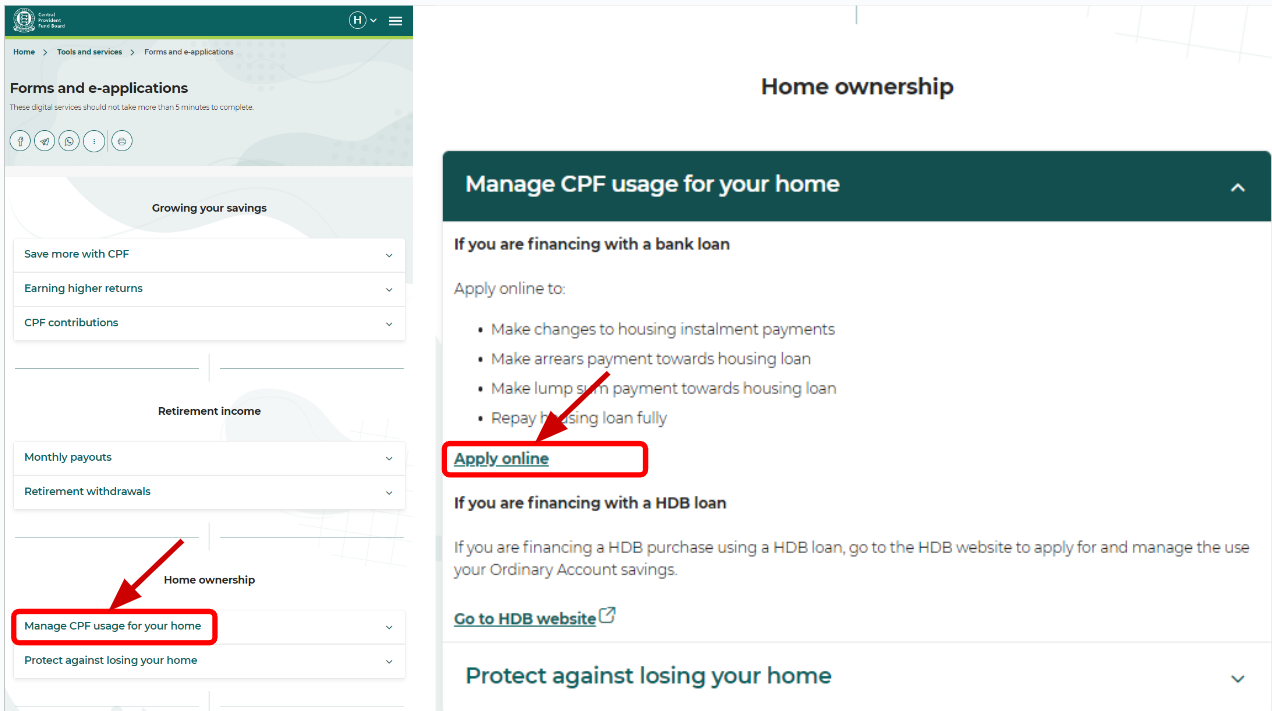
You are now on Forms and e-applications. Scroll past Growing your savings and Retirement income until you reach the Home ownership heading.
Tap Manage CPF usage for your home. The section expands.
The panel splits into two paths. Read the headings before you click anything.
You will be asked to log in with Singpass.
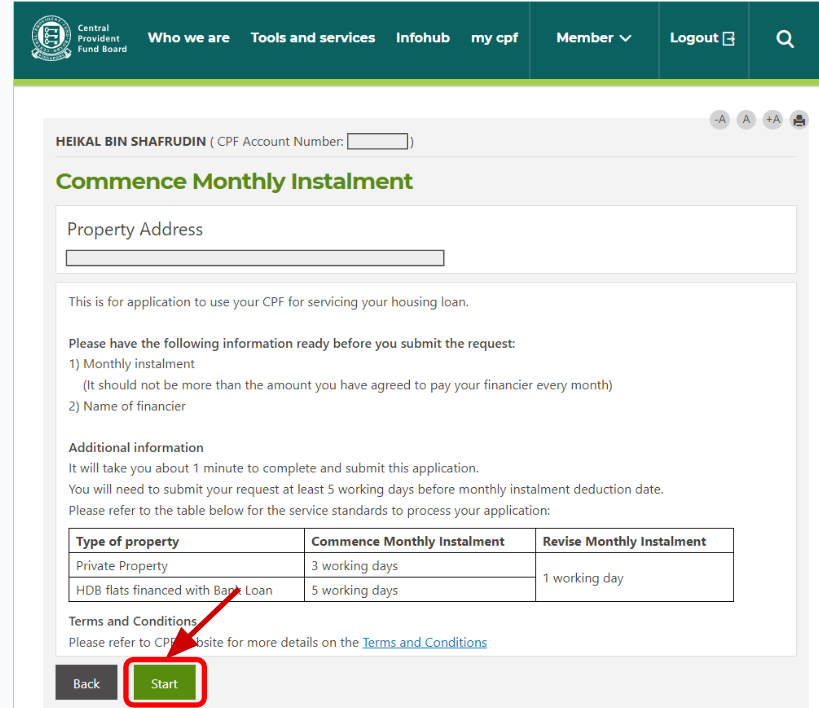
You are now inside Commence Monthly Instalment. Your property address is displayed at the top.
Check it. If you own more than one property, confirm this is the right one before you go any further.
CPF tells you on this screen what it is about to ask for: your monthly instalment, which must not be more than the amount you have agreed to pay your financier each month, and the name of your financier. The same timing rules from the table above are repeated here.
Click Start.
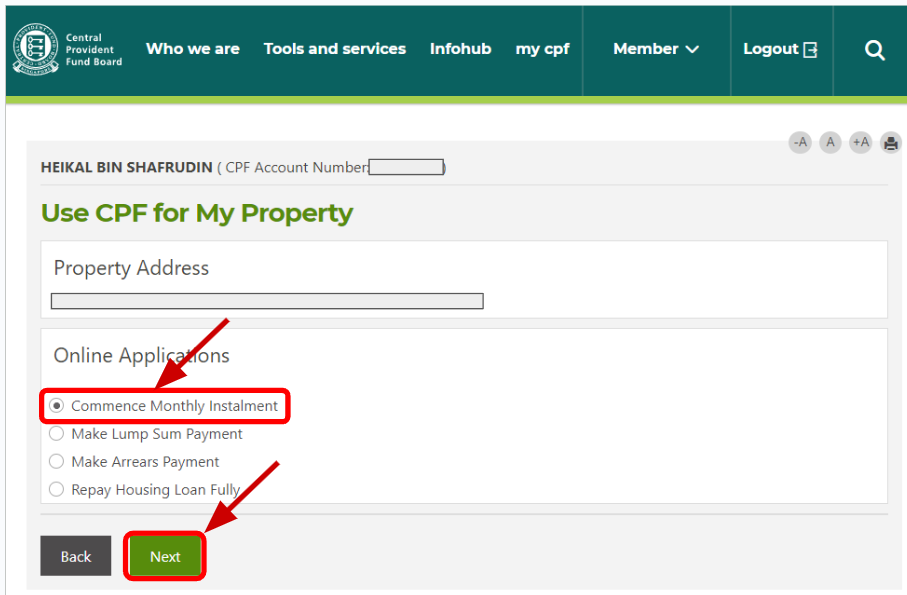
Four options appear under Online Applications. Select Commence Monthly Instalment, then click Next.
The last three are one-off transactions. None of them sets up a recurring deduction.
Financier. Open the dropdown and select your bank. Match it to the name on your Letter of Offer. The list is long and several names look similar.
Monthly Instalment. Enter the amount you have agreed to pay each month. If you own the property with someone else, enter your share only, not the full instalment. The helper below works it out for you.
Effective From. Select the month you want CPF to start paying. The dropdown only offers the next few months. Work backwards from your first instalment date and add the processing time. If the month you need is already too close, pick the next one and pay that first instalment in cash.
Tick the declaration box confirming the information is true and that you have read the Terms and Conditions. Click Next.
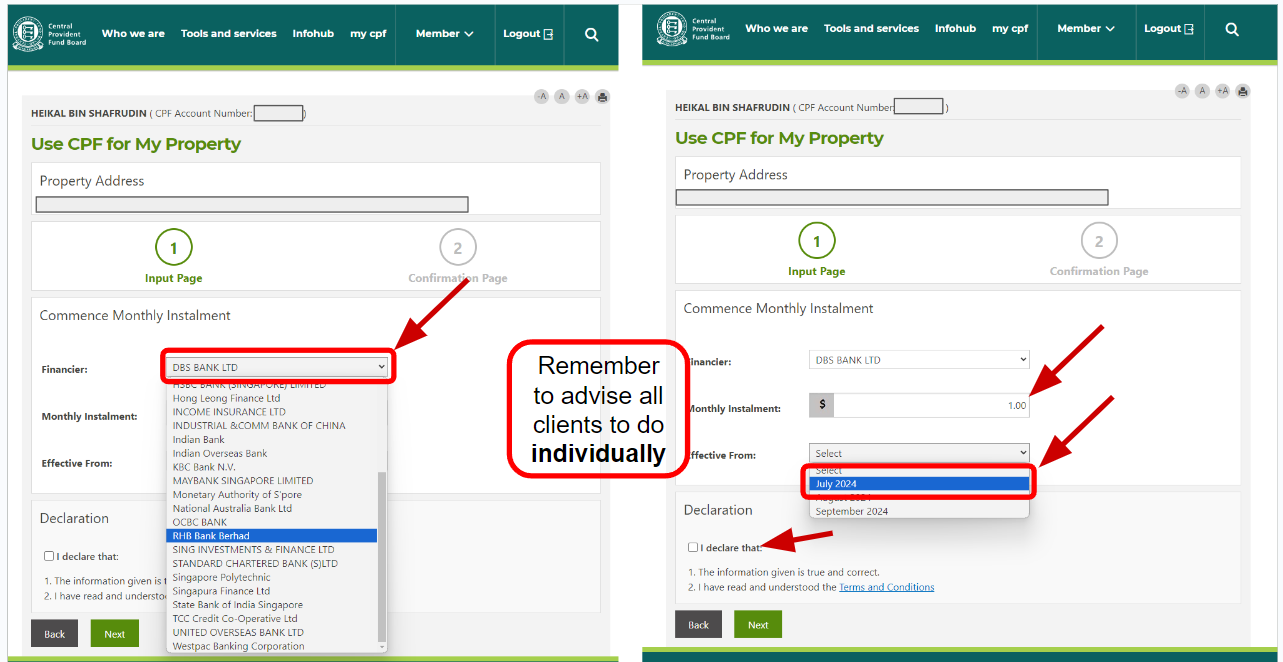
CPF applications are per person, not per property.
If the property is in two names, each owner logs in with their own Singpass and submits their own application. One person submitting does not cover the other. If only one of you applies, only one Ordinary Account is deducted and the rest of the instalment stays in cash.
Together, the two declared amounts should add up to the monthly instalment. They should not exceed it.
Enter the full monthly instalment and how you are splitting it. The two figures below are what each of you types into the Monthly Instalment field at Step 6.
Enter your monthly instalment to see the split.
Check that each Ordinary Account can actually carry its share every month. Any shortfall on the deduction date is taken from your bank account in cash.
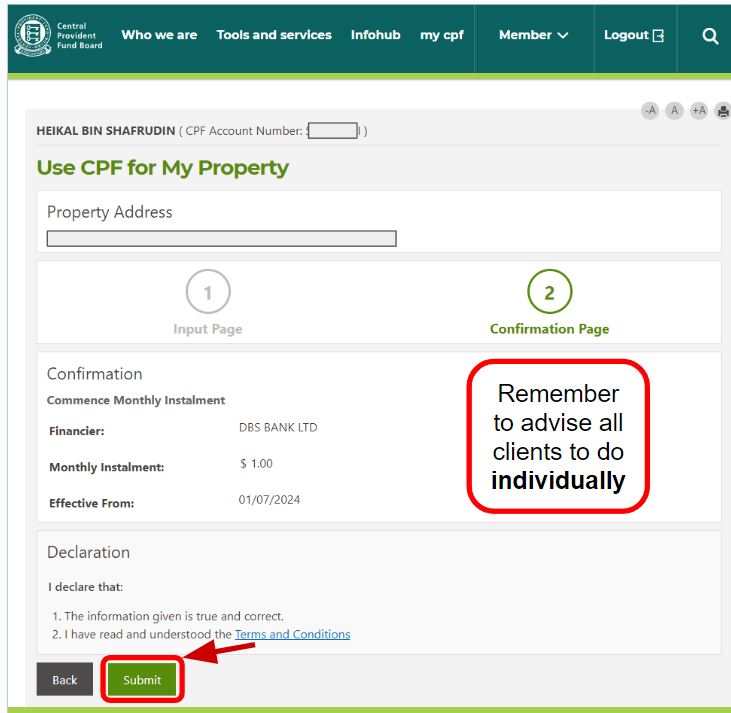
The Confirmation Page shows exactly three things: Financier, Monthly Instalment and Effective From. Read all three again before you submit.
The two errors we see most often:
Confirm the declaration and click Submit.
Save the acknowledgement. Screenshot the reference number or print the confirmation page. If the deduction does not appear in the month you selected, that reference is what you quote.
The deduction starts from the month you selected, subject to the processing times above.
Anything CPF does not cover is still taken in cash. If your Ordinary Account balance is short on the deduction date, the shortfall falls back to your bank account. The instalment gets paid either way. The only question is from where.
If your instalment changes, come back and revise it. Rate revision, repricing, refinancing, partial capital repayment. All of these change the number. Revising takes 1 working day. Your original submission does not update itself.
If you refinance to a new bank, submit a fresh application under the new financier. Do not assume the old instruction carries over.
If any of the six above apply to you, or you are not sure what your cash outlay looks like once CPF is switched on, work it out with your agent before you submit. The form takes one minute. Reversing a wrong assumption about your monthly cashflow takes a lot longer.
This guide is general information about a CPF Board e-service. It is not financial advice and it does not take your personal circumstances into account.
CPF policies, eligibility conditions, processing times and screen layouts are set by the CPF Board and may change without notice. Screenshots were captured at the time of writing. Confirm current requirements at cpf.gov.sg before you apply.